Run an NDA through Copilot or Claude and you get comments. Often good ones. The confidentiality period is long, the definition of confidential information is broad, there is no carve-out for information that was already public.
But they are the comments of a careful lawyer who has never worked at your company. Is five years too long? For you, maybe not. Do you accept a mutual NDA with a non-solicitation clause in it? The model cannot know. Those are your positions, and they are not in the model.
That is what a contract playbook is for.
What a playbook is
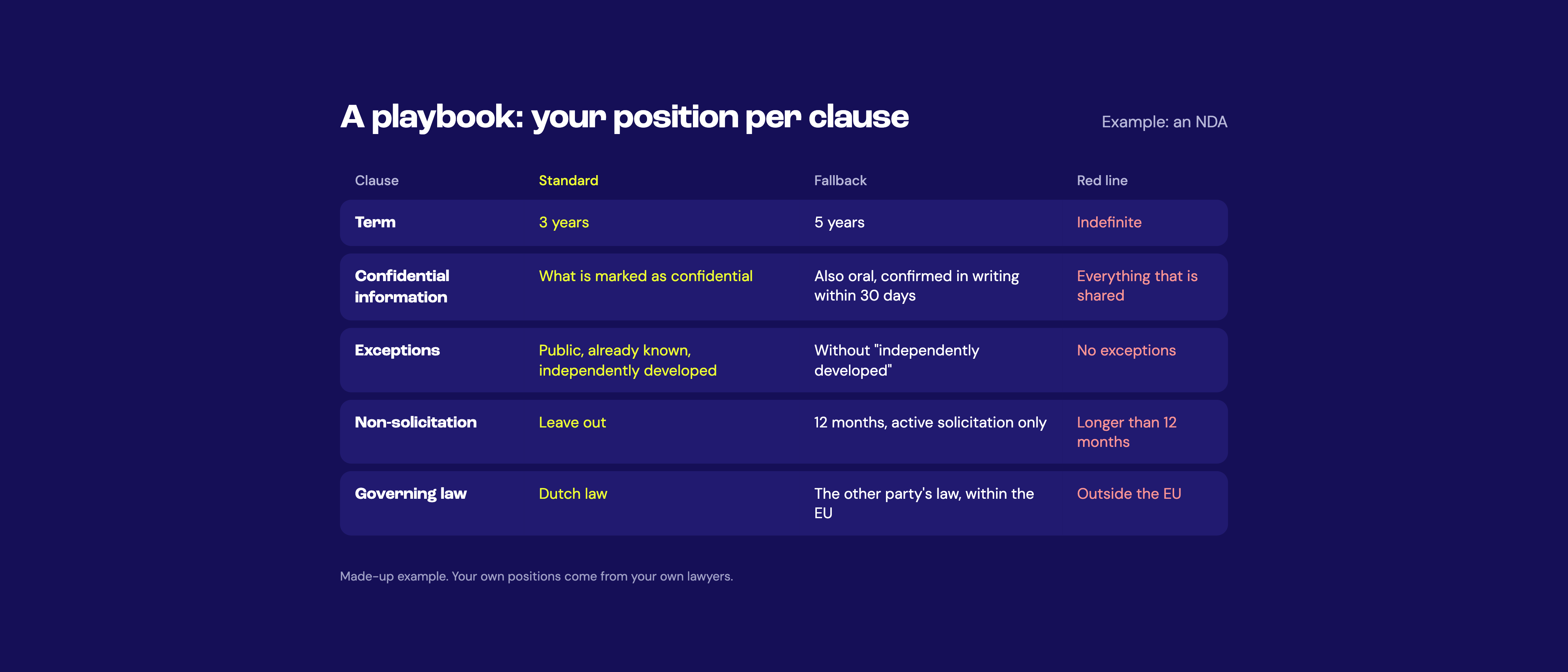
A playbook sets out, for one group of contracts, what you want per clause. Three things:
- The standard position. What your template says, and what you propose first.
- The fallbacks. What you can accept if the other side pushes back, in order.
- The red line. What you do not accept, or only with approval from someone named.
In most teams this knowledge exists. It sits in people’s heads, in approval forms, in comments on old drafts. A playbook puts it in one document that Legal maintains.
With that document, an AI tool reviews a contract the way your team would: it compares each clause with your standard, says which fallback applies, and flags what crosses a red line. The lawyer decides.
This is how we build one.
1. Pick one group of contracts
Not “all our contracts”. One family that comes in often and in roughly the same shape: NDAs, data processing agreements, supply agreements, distribution agreements. Start where the volume is.
2. Collect the variants
A collection of contracts grows for years, until nobody knows which template applies when. Collect every version that is in use, including the ones people keep on their own drive.
AI is useful here: it can compare the variants of each clause across all templates and show where they differ. That is the inventory. For a financial services firm, the clean-up that followed brought 45 agreements back to 20.
3. Write the positions per clause, with the lawyers
This is the part that takes time, and that no tool does for you. Per clause: the standard, the fallbacks, the red line, and who may approve an exception.
Do it with the lawyers who negotiate these contracts. Ask them what they accepted last time and why. Let them disagree; that is where the real positions come out.
4. Give the playbook a fixed form
Fixed headings and one clause table, the same for every family. Clause, standard, fallback 1, fallback 2, red line, approver.
That sounds like administration, but it is what makes the playbook usable for AI. With a fixed form, search finds the right clause, and the model reads the position instead of guessing it.
5. Put short skills on top
A skill is one task, on one page at most: “review an incoming NDA against our playbook”, “draft a reply to the other side’s markup”. The skill does not repeat the positions. It refers to the playbook.
In Copilot that is an agent with instructions and the playbook as a knowledge file. In Claude it is a skill. When Legal changes a fallback, it changes it once, in the playbook, and every skill follows.
6. Test it on contracts you have already done
Take ten contracts from that family that you negotiated recently. Run them. Does the review match what the lawyer did? Where it does not, the cause is usually in the playbook: a position that was never written down, or written down vaguely. Fix it there.
Where the team works in Word, let the result come back into Word, as tracked changes. Then nobody has to copy comments from a chat window.
A playbook pays off without AI too
The clean-up and the playbook are most of the work. The skills are the small part.
One caveat: a playbook is never finished. Positions change with the market and with the people who negotiate. Give it one owner, and update it when a lawyer accepts something that is not in it. Then the next review, by a colleague or by a model, starts from where the team actually is.