“Are we even allowed to use ChatGPT on a file?” In almost every training someone asks it, usually quietly, as if the answer has to be no.
The short answer is yes. No rule forbids a lawyer to use AI. The Dutch bar (NOvA) revised its recommendations on AI in legal practice in November 2026 (in Dutch), and writes that it expects the profession to use AI more often than not. The lawyer stays responsible, and AI stays a tool.
The question that matters is a different one: what goes in, and into which account? On its own page the bar answers whether you may put confidential client documents into a tool like ChatGPT: only with firm contractual safeguards, or with AI tools that are hosted and managed inside your own firm instead of at an outside vendor.
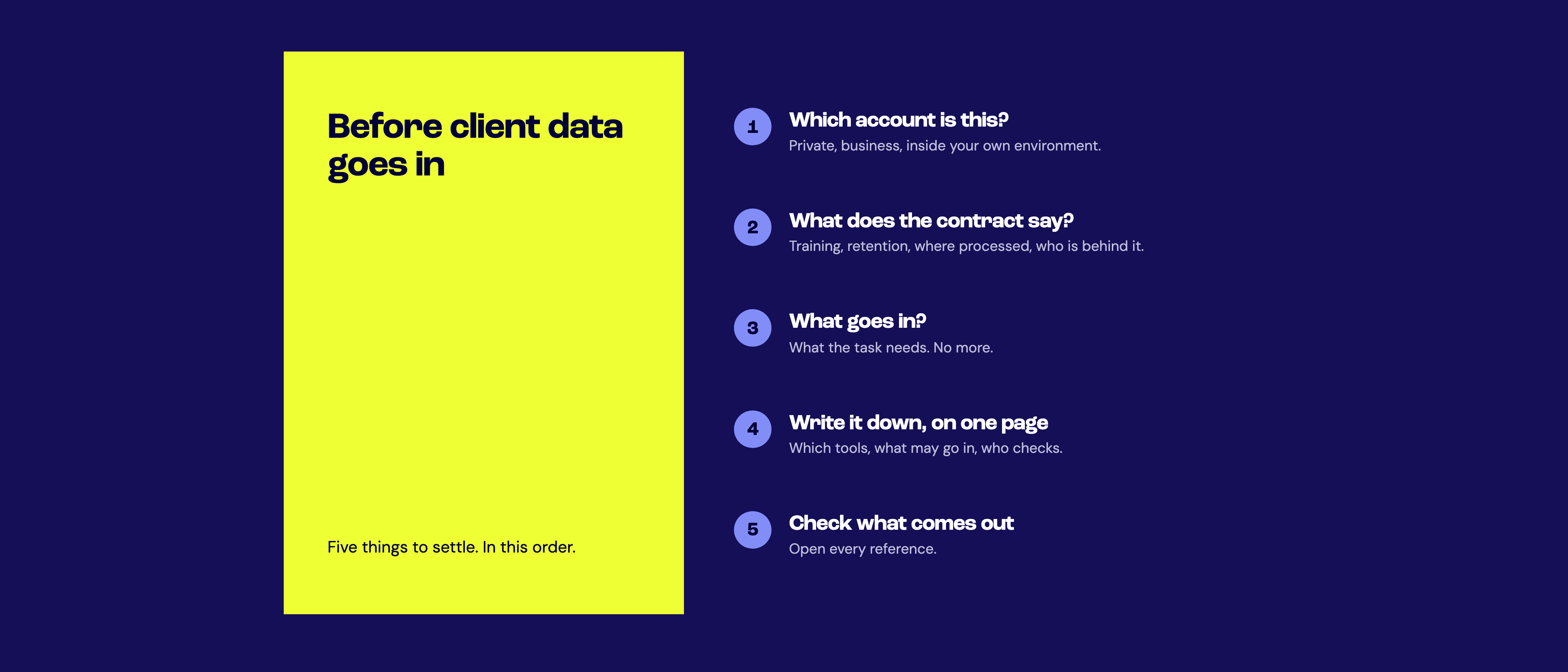
First, what this article is not. It is not advice on professional rules. The bar itself calls the recommendations guidance, not binding requirements, and you had best read them yourself: they run to 34 pages. What follows is what I set up with a firm before client data goes into an AI tool. There are five things, and then one thing you tell your client.
1. Which account is this?
One name covers very different services. ChatGPT on a private account is not ChatGPT on the firm’s business contract, and Copilot inside the firm’s Microsoft environment is not the free version in a browser.
The bar says something here that I often have to explain: free or paid is no measure of safe. There are free models that run locally and are safe, and expensive commercial tools that are not. What counts is how the processing is actually arranged.
In practice the line runs between a personal and a business account, not between free and paid. At OpenAI, Anthropic and Google a paying consumer has the same training setting as a free user. Under a business contract, training on your content is off by default. I checked that in October 2026 on the providers’ own pages. Terms change, so check it for your own account.
So the first step is a list. Which tools does the firm use, on which contract, and who has read that contract?
Put the AI you did not choose on that list too. Word, Outlook and your PDF reader get new functions through updates, and these are sometimes on by default. The bar says so explicitly in the revised recommendations: a list that only looks at what you knowingly took into use is incomplete.
2. What does the contract say?
Not the website and not the FAQ, but the terms. Five questions:
- Is your input used for training?
- What is stored, and for how long?
- Where is the data stored, and where is it processed? Those are not always the same place.
- Who at the provider can see it? “No training” is not “no storage”, and neither means nobody looks.
- Who is behind it: which subcontractors, which underlying model, and which connections? Every plug-in is an extra party with its own terms.
To answer them I follow the document. Where is it read? Where does the text go? When is it gone? And then one question for IT: can this stay inside the EU, without our data being used for training?
The revised recommendations give a list of minimum requirements for the contract with a vendor, from retention to exit. Storage and processing inside the European Economic Area is what the bar advises firms to aim for. It adds, honestly, that storage in Europe is no guarantee in itself. European is not private by default either: there are European providers that train on your conversations by default, even when you pay.
A sentence on a website is not proof. The answer has to be in the contract, also for the party that supplies the model.
A tool that has no clear answer to these five questions is out for client data.
3. What goes in?
Share what the task needs, no more. A question about how to read a penalty clause does not need the names of the parties. A summary of a file does need the file.
Taking out the names does less than it seems. A client can also be recognised by a case number, a striking amount, a defined term or the deal itself. Anonymising is one layer. It does not replace the arrangements of point 2.
If you do it, do it well. Replace names with fixed labels, such as [CLAIMANT_1], instead of blacking them out: without those labels the model no longer understands the clause. Keep the key on your own computer. And mind what people forget: tracked changes and comments in Word, and a black box over text in a PDF. Under that box the text is still there.
So the point is not to share little. The point is to choose. A tool is fine for one use and not for another, and that depends on what goes in. That is why a list of approved tools alone does not work. You need a list of tools with what may go into each.
4. Write it down, on one page
This is the firm’s AI policy. It does not have to be a book. For the people who work with it, one page is enough:
- which tools are approved;
- what may go into each tool, and what may not;
- who checks the result;
- what you do when something ended up in the wrong tool.
A good test for that page: can you show a client where the data of their matter has been? If the answer is “I don’t know”, that is the first thing to fix.
Without that page nobody uses less AI. People pick a tool they know from home, without knowing what is behind it. The bar writes the same, almost word for word.
And a page alone is not enough. At seven in the evening the app on your phone is the easiest. If there is no approved tool that is just as fast, the app wins. A policy works only when the permitted route is also the short route. From firms that do this well, I hear that they give everyone one approved tool with one login. Some do not even block other tools, but show a short reminder with a link to the policy.
Part of it: what you tell your clients. The recommendations mention a standard paragraph in the engagement letter.
And decide about the AI note-taker before the first conversation is recorded. Such a tool turns every meeting into a searchable transcript, including what was said in passing. Which conversations do you exclude, how long does the recording exist next to the minutes, and who may delete it?
5. Check what comes out
What goes in is half of it. The other half is what you do with the result.
In July 2026 a Dutch lawyer was reprimanded by the disciplinary board in ‘s-Hertogenbosch (ECLI:NL:TADRSHE:2026:93, in Dutch). She had copied case law from an AI tool without reading the rulings. The complaint about confidentiality in the same case was dismissed: it could not be established that she had entered confidential data. What went wrong was the checking.
So open every reference and read the paragraph yourself. How to organise that in a team is in the article on AI literacy for lawyers.
And what your client puts in
One risk is not yours. Your client receives your advice, pastes it into a chatbot and asks whether it is right. Or has a conversation with you written up by an AI note-taker.
The revised recommendations have a part of their own on this. Entering correspondence with your lawyer into a public AI tool affects its confidentiality, and in some cases the protection of that information can even lapse. In the United States a judge decided in February 2026 that a defendant’s conversations with a chatbot about his defence were not protected. That is American law and one judge at first instance. It does show where this can go.
The bar advises telling your client, for instance in the engagement letter. It is one paragraph.
And in-house lawyers?
The bar’s recommendations are written for lawyers admitted to the bar. A legal department follows the arrangements of its own organisation, and those often exist already: IT has then recorded which tools run on which contract. The five things above are the same. Only point 1 is often done, and the work starts at point 3.
What I am not saying here
One caveat: the revised recommendations are from this month, and the bar calls them a living document. They are also much broader than this article, with parts on agents, on training junior lawyers and on billing. Read them, and above all part A on policy and vendors.
This is how we work ourselves: before client data goes in, we set up together which provider and which account, where the data is processed, what is stored and for how long, and that nothing is used for training. If you want to go through that with your own team, that is where a training on your own work starts.